
Petrol Pump Lubricant Stock Management for Oil, AdBlue and Accessories
Manage the products you sell apart from fuel — with the same control you have over your tanks.
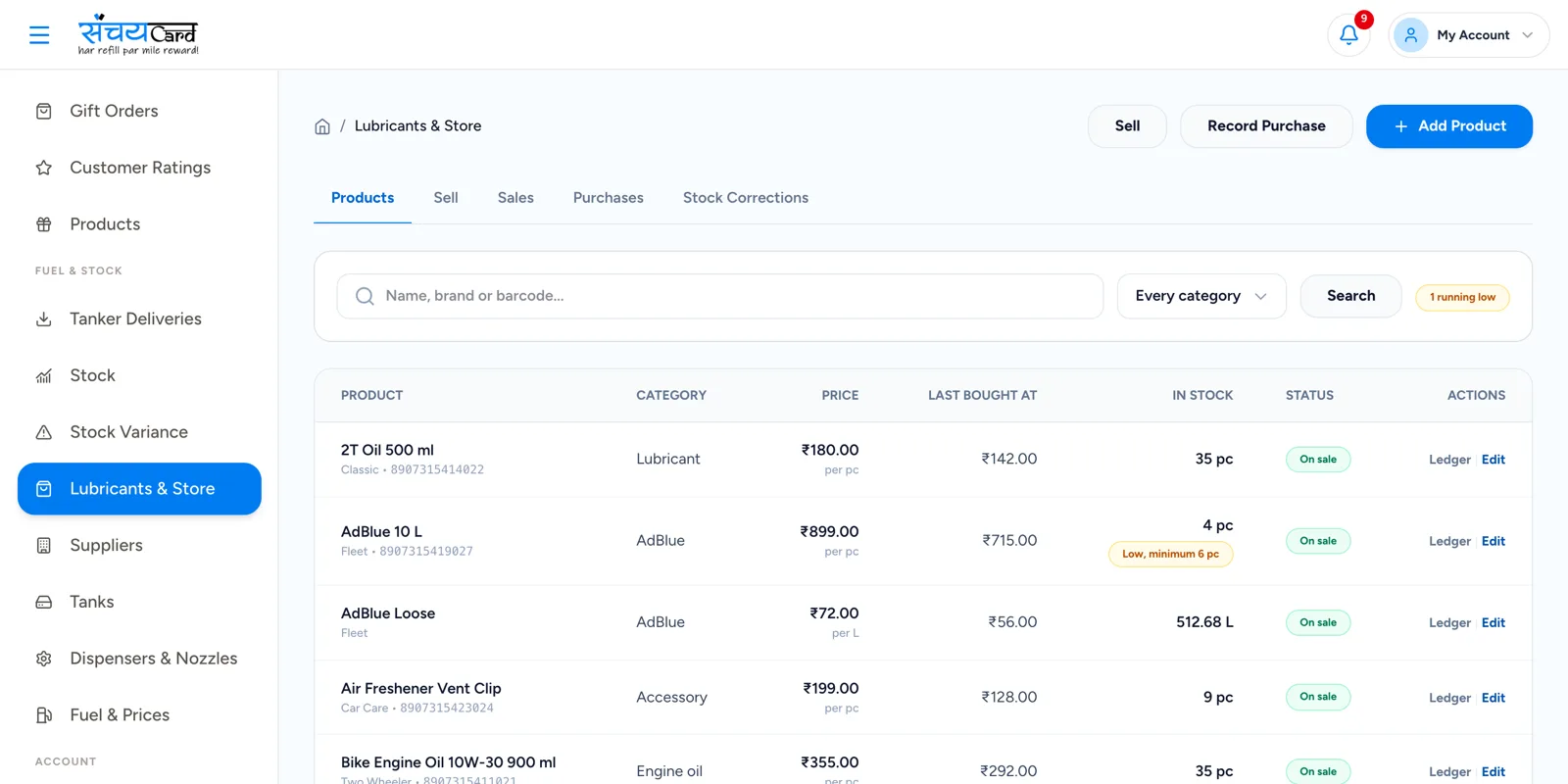
The shelf needs a stock register too
Engine oil, coolant and AdBlue are sold in small numbers every day, by whoever is near the shelf. At the end of the month the stock on the shelf and the stock in the book rarely agree.
Sanchay gives every product its own record in the product master, with barcode, purchase, sales and stock. You can set a minimum stock level for each product and see product-wise reports.
Products are bought from suppliers just like fuel. A lubricant purchase is entered in purchase management with its supplier, invoice, quantity and rate, and it adds to the stock of the product. Each sale reduces that stock again. The product-wise reports then show what was bought, what was sold and what should be on the shelf, with the minimum stock level next to it — so the products that are running low are the ones you order next.
Lubricant and product management
Engine oil, lubricants, coolant, AdBlue, accessories and other store products.
Product master
One list of all the products you sell.
Barcode
Products are identified by barcode.
Purchase
Purchases add to the product stock.
Sales
Sales are recorded product-wise.
Stock
The stock of each product is kept up to date.
Minimum stock level
Set the minimum stock level for each product.
Product-wise reports
Reports for every product.
From purchase to sale
-
1
Create the product
Add the product to the product master with its barcode.
-
2
Record the purchase
Purchases from the supplier add to the stock.
-
3
Record the sale
Each sale is recorded against the product and reduces the stock.
-
4
Review the reports
Product-wise reports show purchase, sales and stock, with the minimum stock level for reference.

Why it matters
Non-fuel sales are visible
Product-wise reports show the sales and stock of every product.
Shelf stock is accountable
Every purchase and sale moves the stock of the product.
Plan the next order
The minimum stock level tells you which products need attention.
Questions about lubricants and other products
Engine oil, lubricants, coolant, AdBlue, accessories and other store products.
Yes. Barcode is part of the product record in the product master.
Yes. Lubricant purchases are entered in purchase management with supplier, invoice, quantity and rate, so they are part of the supplier ledger and the outstanding payable, like fuel purchases.
Yes. A minimum stock level can be set for each product and is shown with its stock.
Related features
Every module shares the same data, so one entry is never typed twice.
Purchases & Suppliers
Manage fuel, lubricant and other purchases with invoices, payment status and supplier ledger.
Explore purchases & SuppliersTank & Stock Management
Track tanks, daily dip readings, expected and physical stock, variance and adjustments in one place.
Explore tank & Stock ManagementReports & Analytics
Sales, stock, credit, loyalty, staff and expense reports from one dashboard.
Explore reports & AnalyticsLubricants & Other Products is part of Sanchay petrol pump billing software. See all petrol pump software features
See lubricants & Other Products in a demo
Book a demo with our team and see how Sanchay runs your pump — from shifts and stock to staff and credit.