
Petrol Pump Fleet Management with Vehicle-Wise Records and Fuel Requests
Manage customers with multiple vehicles from one account, and let them request fuel directly from their mobile app.
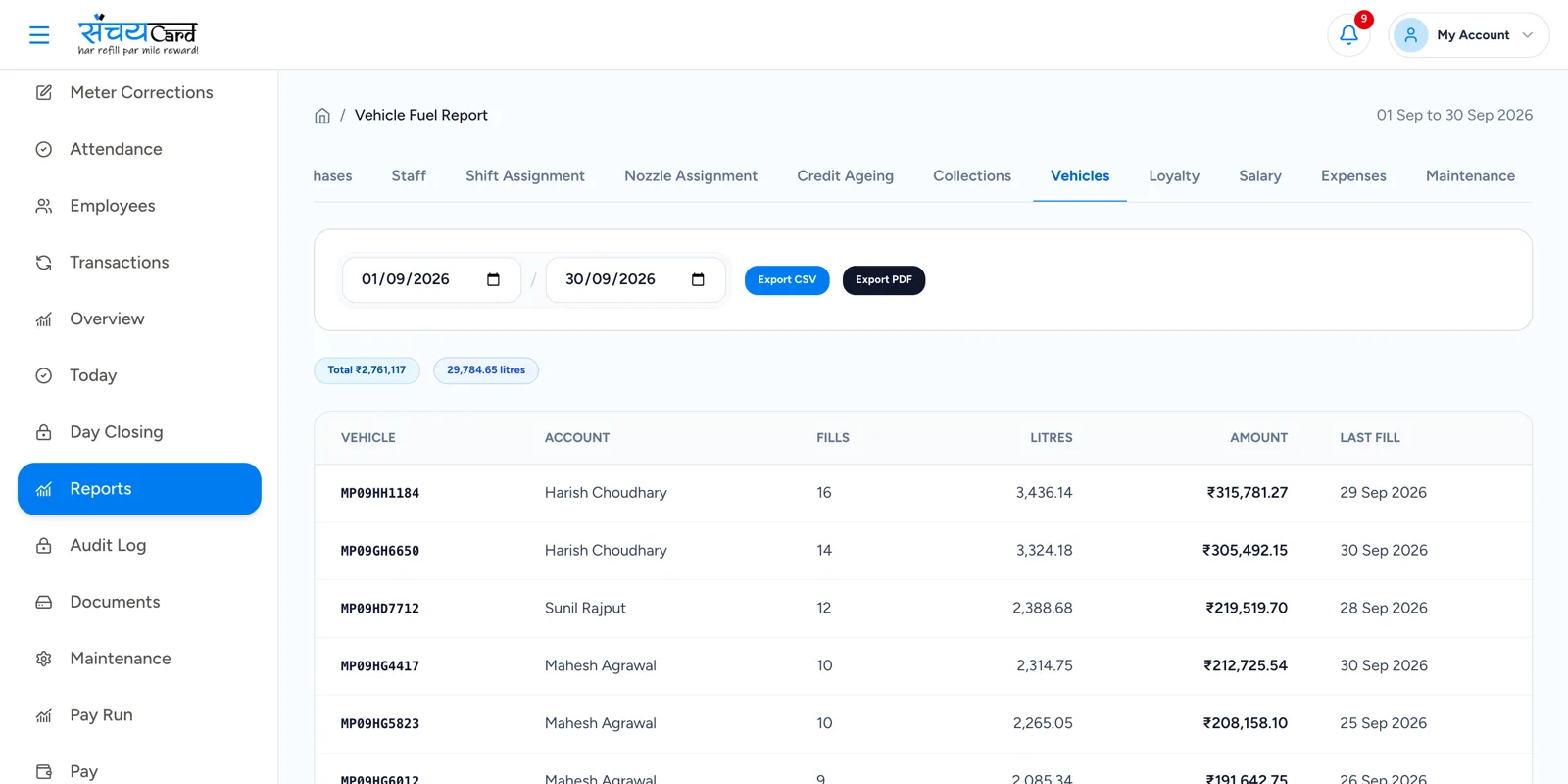
One customer, twenty vehicles, one account
A transporter does not want one total at the end of the month. He wants to know how much diesel went into each vehicle. And your staff do not want a phone call for every truck that is on its way.
In Sanchay a fleet customer has one account with all vehicles and drivers under it. Every transaction is recorded vehicle-wise, and the customer can send a fuel request for a specific vehicle straight from the app.
Fleet and vehicle management at the pump
Fleet / customer account
One account for the fleet owner.
Multiple vehicles
All vehicles of the customer are listed under the account.
Vehicle numbers
Each vehicle is recorded with its number.
Vehicle-wise fuel history
See the fuel filled in each vehicle.
Driver management
Drivers are recorded under the fleet.
Vehicle-wise credit
Credit is tracked for each vehicle.
Vehicle-wise transaction records
Every transaction is linked to a vehicle.
Fleet-wise reporting
Reports for the whole fleet.
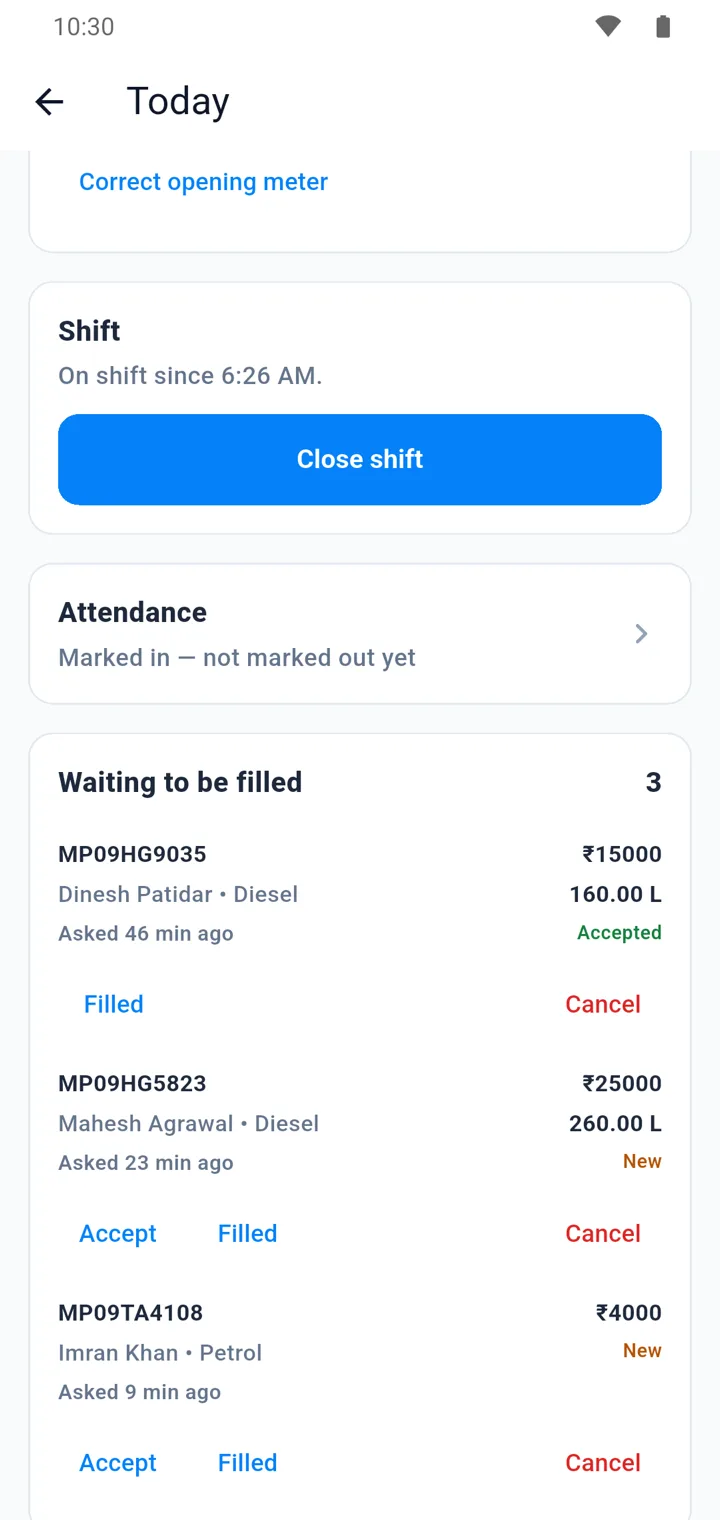
The fuel request system
Fleet customers communicate fuelling requirements without calling the pump.
-
1
Customer submits a request
The request is sent from the credit customer app for a specific vehicle.
-
2
Pump employees receive it
The request appears in the staff app, where it can be viewed and accepted.
-
3
Fuelling is done
The employee starts fuelling and enters the actual quantity.
-
4
Transaction is completed
It is linked to the vehicle and customer, and the credit balance is updated.
Example
Customer submits: “Please fill ₹10,000 diesel in Vehicle MP09XX1234.” Pump employees receive the request in their app.
Why it matters
Fewer phone calls
The request carries the vehicle and the amount in writing.
Vehicle-wise clarity
The customer sees which vehicle took how much fuel, and so do you.
Credit stays correct
Completing the request updates the credit balance of the customer.
Questions about fleet and fuel requests
Yes. A fleet or customer account can have multiple vehicles and drivers, each with its own fuel history, credit and transaction records.
The customer submits the request in the credit customer app. Pump employees receive it in their app, where they can view it, accept it and start fuelling.
The employee enters the actual quantity when completing the transaction. The transaction, not the request, is what is linked to the vehicle and added to the credit balance.
No. Sanchay records the fuelling of each vehicle at your pump — fuel history, credit and transactions. It does not track vehicles on the road.
Related features
Every module shares the same data, so one entry is never typed twice.
Credit Customer Management
Manage credit customers, credit limits, outstanding balances, payments, ageing and statements.
Explore credit Customer ManagementReports & Analytics
Sales, stock, credit, loyalty, staff and expense reports from one dashboard.
Explore reports & AnalyticsFuel Sales & Meter Reading
Record opening and closing meter readings nozzle-wise. Litres and sale amount are calculated automatically.
Explore fuel Sales & Meter ReadingFleet & Fuel Requests is part of Sanchay petrol pump billing software. See all petrol pump software features
See fleet & Fuel Requests in a demo
Book a demo with our team and see how Sanchay runs your pump — from shifts and stock to staff and credit.